October 12, 2026 • 8 min read
Claude Code Mods: 3 I Use Daily and How to Build One
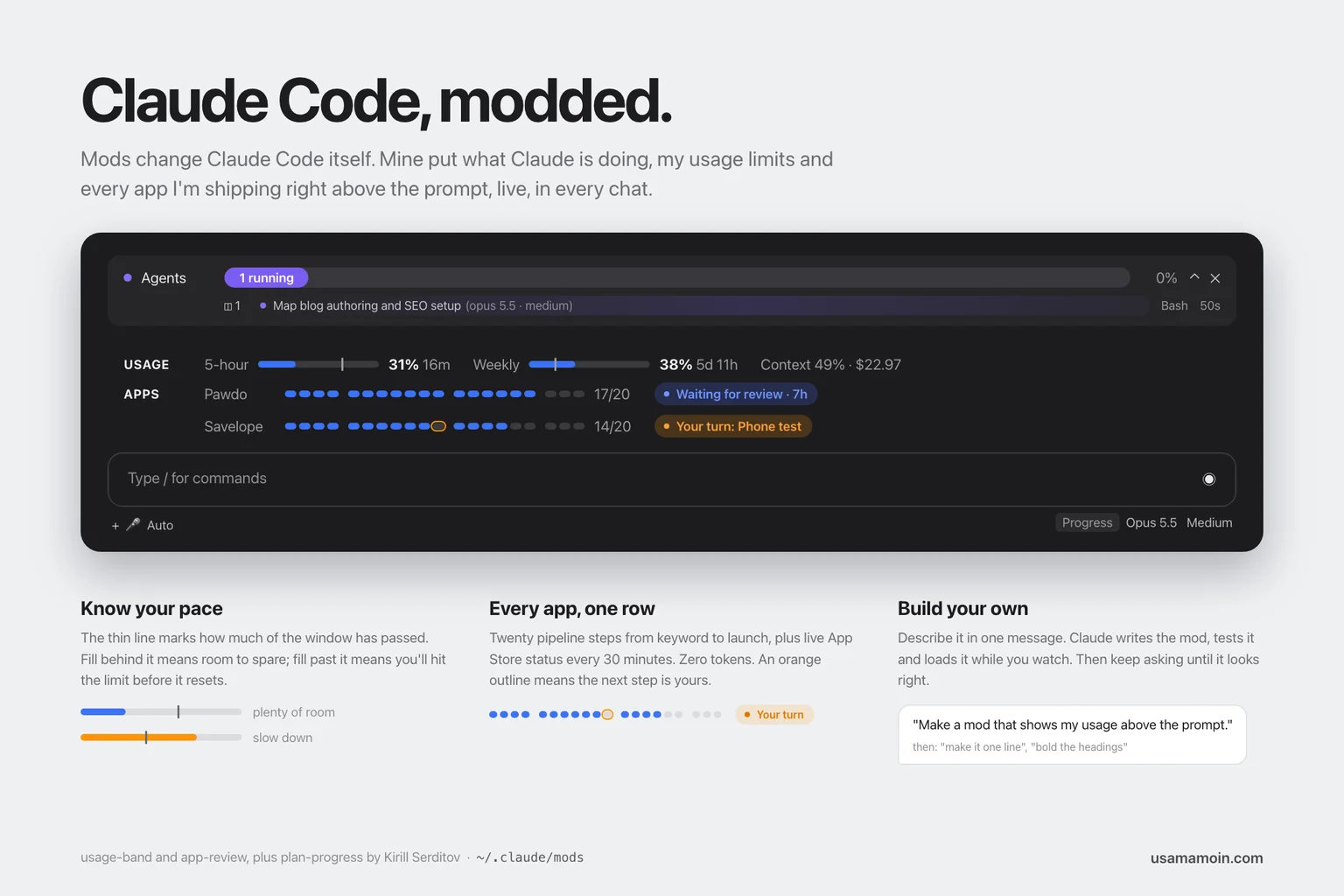
Claude Code mods change Claude Code itself instead of your project. A mod can put a live bar above the prompt, open a panel beside the chat, add a slash command or pop up a notice when something happens. The feature is in early access, and I spent one afternoon building three of them.
I'm juggling a lot at once right now: two iOS apps in the App Store pipeline, this site, and a dozen scheduled AI routines that run while I sleep. Most of that work happens out of sight. The mods fixed that, and the most useful one cost zero tokens to run.
This is what each mod does, what it caught on its first day, and how you can build your own with one message.
What Claude Code mods are
A mod is a small TypeScript module that hooks into Claude Code's own events and interface. According to Anthropic's mods documentation, a mod can draw a pane beside the transcript or a band above the prompt, with tabs, buttons and text fields. It can also react to tool calls and prompts, add commands and run on a timer.
That makes mods different from the other ways of extending Claude Code. A skill teaches Claude how to do a task. An MCP server gives Claude new tools. A mod changes what you see and how the app behaves around you. Anthropic's own sample, Token Weather, is about 80 lines and shows context window usage as a forecast above the prompt, as The New Stack reported.
One warning from the docs is worth repeating: a mod is code that runs with your permissions inside Claude Code. Read a mod before you install it, the same way you would read a script before running it.
Mod 1: Claude Code usage limits, always in view
Paid Claude plans have two limits that matter in Claude Code: a 5-hour window and a weekly cap. You can check them with /usage, but nobody types that every ten minutes. So the first mod draws both above the prompt as thin bars:
USAGE 5-hour 31% (16m left) Weekly 38% (5d 11h left) Context 49% · $22.97
The pace marker
Each bar carries a small vertical line that marks how much of the window has already passed. If 2.5 hours of a 5-hour window are gone, the line sits in the middle. Fill that stops before the line means you have room. Fill that runs past it means you will hit the limit before it resets, at your current rate.
That one line changed how I work. A raw 38% tells you nothing. 38% with the line at 21% tells you to stop launching parallel agents for the afternoon.
Colour only when it matters
The bars stay blue until 70%, turn orange from 70% and go red with a "!" from 90%. At 90% a popup fires once per window. Context and the cost of the current chat sit at the end of the row as plain text, because they matter less than the limits.
Mod 2: an App Store pipeline per app
I ship iOS apps through a 20-step pipeline: keyword research, design, build, phone test, store screenshots, upload, submit, then launch and growth. Every app keeps its progress in a JSON file. The second mod reads those files and draws one row per app:
APPS Pawdo 17/20, Waiting for review · 7h | Savelope 14/20, Your turn: Phone test
Each row is a bar of 20 segments, grouped by phase. Done steps are blue. A step waiting on me gets an orange outline. Hovering a segment shows the step's name.
It replaced 24 Claude chats a day
Before this mod, a scheduled routine opened a new Claude chat every hour to check whether Pawdo had cleared App Store review. Each run burned tokens to report one sentence: still waiting. About 24 chats a day, for one line of news.
The mod asks App Store Connect directly every 30 minutes through a small read-only script that uses my existing API key. No model call, so no tokens. Every open chat shares one cached result, so Apple gets one request per half hour however many windows I have open. When the status changes, I get a popup and a sound in whichever chat is open. I deleted the hourly routine the same day.
What it caught on day one
On its first run the Savelope row showed 14 of 20 steps done, with an orange outline on step 11. The phone test. I had skipped it and kept building store screenshots and legal pages on top of an app I had never run on a real phone. I designed that pipeline myself, and I still missed it, because the only place the gap existed was a JSON file.
That is the real value of mods for anyone running more than one thing at a time. They don't make Claude any smarter. They make your own system visible.
Mod 3: plan-progress, by Kirill Serditov
The third mod isn't mine. plan-progress draws a live progress bar for whatever Claude is working on, including each background agent and the tool it is running. I read its code before installing, which took ten minutes: it runs a few shell commands to detect light or dark mode and makes no network calls.
Installing a mod from a marketplace takes two commands in a terminal:
claude plugin marketplace add zycck/claude-mods
claude plugin install plan-progress@zycck-mods
How to build your own Claude Code mod
You don't need to read the API to build a first mod. In Claude Code, describe the mod in plain words, the way you would ask a colleague:
Make a mod that shows my 5-hour and weekly usage above the prompt.
Claude writes the mod, type-checks it, writes a test and validates it. The first time, Claude Code asks whether to enable hot reloading for the session. Say yes, and the mod appears as soon as Claude's reply finishes. From there you keep asking until it looks right. My usage bar went through about eight rounds: "make it look less old school", "use real progress bars", "make it one line", "bold the headings".
Keep it in every chat
A mod built this way lives in a folder for that session. To load it everywhere, move it somewhere permanent, such as ~/.claude/mods/, and list the folder in the env block of ~/.claude/settings.json under CLAUDE_CODE_PLUGIN_DIRS. Or simply ask Claude to do it. If you use the desktop app, quit it fully and reopen it afterwards. Chats that were already open keep the old setting.
Three mistakes I made so you don't have to
- Bands can hide each other. If a mod draws its band without passing control to the mods beneath it, the others disappear. My usage band hid plan-progress for an hour before I noticed. The fix is to render what sits beneath first and add your section after it.
- Desktop text isn't terminal text. Layout is measured in character cells, but the desktop app uses a narrower proportional font. My usage row decided context and cost would not fit when there was plenty of room. Let the last item truncate instead of guessing widths.
- Interactive drawings need a size. An SVG drawn with hover support renders in a frame. Without an explicit height it fell back to a tall default and pushed a whole row out of view.
What to build first
Start with the thing you check most often by hand. For me that was usage and App Store review. For you it might be a CI run, a deploy, an inbox count or an error rate. If you are already paying a model to check something on a schedule, that is the best candidate of all, because a mod can usually read the same source directly for free. If your scheduled automations have grown the way mine did, my notes on AI workflow automation examples and how to audit AI-written code pair well with this.
And if you want help turning an AI prototype into something you can actually run in production, that is the work I do in AI app development.
Frequently asked questions
What are Claude Code mods?
Mods are small TypeScript modules that change Claude Code itself. They can draw a band above the prompt or a side panel, add slash commands, show popups and react to tool calls. They are in early access, so the API may change between releases.
Are Claude Code mods safe to install?
A mod runs with your permissions inside Claude Code, so treat it like any script. Read the code first, check what it runs and whether it makes network calls, and install only from authors you trust.
Can a mod show my Claude Code usage limits?
Yes. A mod can read the session's 5-hour and weekly rate limit figures, context window fill and cost, and draw them above the prompt. Mine adds a pace marker so you can see whether you will hit the limit before it resets.
Do mods use tokens?
Only if they call the model. A mod that reads a file or an API and draws the result spends no tokens, which is why it can replace scheduled AI checks that run every hour.
How do I make a Claude Code mod load in every chat?
Put the mod in a permanent folder and list it in CLAUDE_CODE_PLUGIN_DIRS in the env block of ~/.claude/settings.json, or install it from a marketplace with claude plugin install. Then restart the desktop app.
Related service
AI App Development
Production-ready AI systems and agent workflows that actually ship.

About the author
Usama Moin
Technical Consultant & Product Builder
Usama Moin has 11+ years of experience building revenue-focused web, mobile, and AI products for startups and scale-ups. He works hands-on across product strategy, full-stack engineering, React Native, and production AI systems.
Frequently asked questions
What are Claude Code mods?
Mods are small TypeScript modules that change Claude Code itself. They can draw a band above the prompt or a side panel, add slash commands, show popups and react to tool calls. They are in early access, so the API may change between releases.
Are Claude Code mods safe to install?
A mod runs with your permissions inside Claude Code, so treat it like any script. Read the code first, check what it runs and whether it makes network calls, and install only from authors you trust.
Can a mod show my Claude Code usage limits?
Yes. A mod can read the session's 5-hour and weekly rate limit figures, context window fill and cost, and draw them above the prompt. Mine adds a pace marker so you can see whether you will hit the limit before it resets.
Do mods use tokens?
Only if they call the model. A mod that reads a file or an API and draws the result spends no tokens, which is why it can replace scheduled AI checks that run every hour.
How do I make a Claude Code mod load in every chat?
Put the mod in a permanent folder and list it in CLAUDE_CODE_PLUGIN_DIRS in the env block of ~/.claude/settings.json, or install it from a marketplace with claude plugin install. Then restart the desktop app.